
Disclosure: Gamingshopee is reader-supported. If you buy through links on this page, we may earn a commission at no extra cost to you.
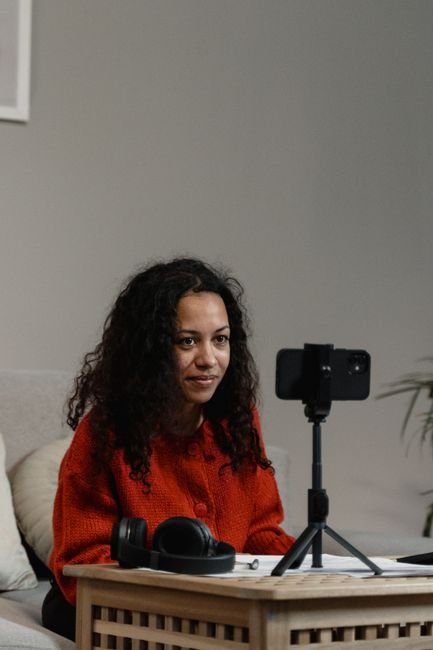
Your webcam is often the first thing viewers notice within seconds of clicking into your stream, before your gameplay, before your overlay design, before anything else. A muddy, low-light, choppy webcam feed undercuts an otherwise polished stream, while a genuinely good one makes even a simple setup feel professional and well put together. The good news in 2026 is that strong webcam options now exist across a much wider price range than a few years ago.
Here are the best webcams for streaming in 2026, across budget, mid-range, and premium 4K categories, along with what actually matters when comparing sensor quality, frame rate, and low-light performance.
Best Webcams for Streaming (2026) — Quick Comparison
| Webcam | Resolution/FPS | Price | Best For |
|---|---|---|---|
| Elgato Facecam MK.2 | 1080p60, uncompressed, HDR | ~$139.99-149.99 | Best overall image quality at 1080p |
| Elgato Facecam Pro | True 4K/60fps (Sony STARVIS sensor) | $259.99 | Best 4K performance |
| Razer Kiyo Pro Ultra | Raw 4K/30fps or 1080p/60fps | $399.99 | Best low-light / largest sensor |
| Logitech StreamCam | 1080p60 | ~$170 | Best for vertical + landscape streaming |
| Elgato Facecam Neo | 1080p60 | ~$60 | Best budget |
How We Picked These
- We prioritized 60fps at streaming resolution: smooth motion matters more for a live face-cam feed than raw resolution, especially during reactive gameplay moments.
- We weighed sensor size and low-light performance heavily: most home streaming setups don’t have studio lighting, so how a webcam handles average room lighting matters a lot.
- We covered a genuine budget option: not every streamer needs or can justify a $250+ webcam, so we made sure a legitimately good sub-$100 pick made the list.
- We checked software and platform compatibility: OBS, Zoom, and Teams support varies between webcam software ecosystems, worth confirming before buying.
Best Overall: Elgato Facecam MK.2
The Facecam MK.2 delivers what’s widely regarded as the best 1080p image quality of any current webcam, uncompressed 1080p60 capture that avoids the softness and artifacting compressed webcam feeds are prone to, particularly during fast motion or busy backgrounds. Its Sony sensor and HDR support handle mixed and challenging lighting noticeably better than most webcams in its price range, and pan-tilt-zoom control lets you fine-tune framing without physically repositioning the camera.
At roughly $139.99-149.99, it sits at a genuinely accessible price for the image quality it delivers, current pricing has actually come down from its original $199.99 launch MSRP, making it an easier recommendation than it was at release. Unless you specifically need 4K resolution, this is the safest, highest-value pick for most streamers.
Best 4K: Elgato Facecam Pro
The Facecam Pro is one of the few webcams that delivers genuine 4K at a full 60fps, rather than the common compromise of 4K at 30fps or dropping to 1080p to hit 60fps. Its Sony STARVIS sensor is specifically tuned for strong low-light performance, a real advantage for evening or night streaming sessions without professional lighting. Notably, it skips a built-in microphone entirely, a deliberate design choice on the assumption that anyone buying a $259.99 4K webcam already has a dedicated microphone in their setup.
If you’re streaming at 1080p or lower resolution regardless, the extra 4K capability here won’t add much practical benefit, save the money and go with the Facecam MK.2 instead. But if your setup, or future plans, call for genuine 4K streaming or high-quality recorded content, this is the strongest option currently available at its price point.
Best Low-Light Performance: Razer Kiyo Pro Ultra
The Kiyo Pro Ultra carries the largest sensor of any current Kiyo webcam at 1/1.2 inches, meaningfully larger than most competing webcams, which translates directly into better performance in dim or mixed lighting, a common real-world condition for evening streamers without dedicated studio lights. It captures raw 4K at 30fps or 1080p at a smooth 60fps, giving you flexibility depending on whether resolution or frame rate matters more for your specific content.
At $399.99, it’s the most expensive pick on this list, a genuine premium purchase that makes the most sense for streamers who’ve already dialed in the rest of their setup and are specifically bottlenecked by webcam image quality in low-light conditions. For most streamers with decent room lighting or an inexpensive key light, the Facecam MK.2 or Facecam Pro will deliver most of the practical benefit at a meaningfully lower cost.
Best for Flexible Framing: Logitech StreamCam
The StreamCam delivers sharp, reliable 1080p60 video with a standout practical feature: easy switching between landscape and vertical orientation, genuinely useful if you’re creating content for both traditional streaming platforms and vertical-format short clips for TikTok or YouTube Shorts. Smart auto-focus and exposure adjust well to a moving subject without requiring manual tweaking mid-stream.
At around $170, it sits in a similar price range to the Facecam MK.2, and the choice between them mostly comes down to whether the StreamCam’s vertical-format flexibility matters for your specific content plans. If you’re purely focused on traditional landscape streaming, the Facecam MK.2’s image quality edge makes it the stronger pick at a similar price.
Best Budget: Elgato Facecam Neo
At around $60, the Facecam Neo won’t match the image quality of the pricier picks above, its smaller 1/2.9-inch CMOS sensor shows real limitations in anything but good lighting, but it delivers genuinely solid 1080p60 video with working autofocus and a physical privacy shutter, a nice touch not always included even on pricier webcams. For streamers just starting out, or anyone who needs a functional, presentable webcam without a significant budget commitment, this covers the fundamentals well.
If your streaming setup includes reasonably good room lighting, even something as simple as a cheap ring light, the practical gap between this and the pricier picks narrows meaningfully. Lighting quality often matters more than webcam sensor size for how professional your feed actually looks to viewers, a lesson worth internalizing before spending your entire webcam budget chasing marginal sensor improvements.
Resolution vs Frame Rate: What to Prioritize
For a live face-cam feed during gameplay, 60fps at your target resolution generally matters more than chasing the highest possible resolution. Motion, reactions, hand gestures, all look noticeably smoother at 60fps than 30fps, while the resolution jump from 1080p to 4K is a smaller practical improvement for most viewers watching a compressed stream rather than a high-bitrate local recording. Many 4K webcams, including some on this list, actually drop to 30fps at full 4K resolution and only hit 60fps once you scale back to 1080p, worth checking carefully before assuming a “4K” label means 4K at smooth frame rates.
If you’re primarily live streaming rather than producing high-quality recorded video content, prioritize a webcam that holds 60fps at 1080p reliably over one that offers 4K only at a lower frame rate. Save the 4K priority for content where you’re recording locally at high bitrate and quality matters more than live smoothness.
It’s also worth factoring in your upload bandwidth and streaming platform’s bitrate limits, since even a genuinely excellent 4K feed gets compressed down significantly by platforms like Twitch, which cap bitrate well below what’s needed to preserve full 4K detail for most streamers. In practice, this means a large share of the visual benefit from a premium 4K webcam shows up more in local VOD recordings and clips than in the live stream itself, worth keeping in mind when deciding how much of your budget to put toward resolution versus other parts of your setup.
Companion Software and Manual Controls
Beyond raw hardware, companion software meaningfully affects how usable a webcam is day to day. Elgato’s Camera Hub, used across the Facecam line, gives manual control over exposure, focus, white balance, and framing, letting you dial in a consistent look once and save it rather than relying purely on auto-adjustments that can shift unexpectedly mid-stream when lighting changes slightly. Razer’s Synapse software offers similar manual override options for the Kiyo line, along with specific low-light tuning controls that matter given that model’s low-light focus.
If you’ve ever had a webcam auto-adjust exposure awkwardly mid-stream, brightening or darkening in response to something moving through frame, manual control software is the fix, and it’s worth checking whether a webcam you’re considering supports it before buying rather than assuming all “smart” auto-adjustment features work reliably in practice. Budget webcams like the Facecam Neo typically offer more limited manual control than their pricier siblings, a real tradeoff worth weighing against the price difference.
Mounting and Positioning
Most webcams ship with a basic monitor clip mount, functional but not always ideal depending on your monitor’s bezel thickness or your desired camera height and angle. If you’re running a multi-monitor setup or a monitor with an unusually thin or thick bezel, check the included mount’s compatibility before buying, or budget separately for a proper desk mount or small tripod, which gives more precise positioning control than a basic clip.
Camera height and eye-line matter more for how professional a stream looks than most people expect, a webcam positioned too low creates an unflattering upward angle, while one mounted too high creates a distant, disconnected feel. Aim for the camera roughly at eye level or slightly above, and take a few minutes adjusting position and testing the framing in your streaming software before going live, since small positioning tweaks make a genuinely noticeable difference in how put-together your stream looks to viewers seeing it for the first time. Background clutter within frame also matters more than people expect, a clean, deliberately arranged background behind you reads as far more professional than an equally good camera pointed at a messy room, and it’s a free improvement that costs nothing beyond a few minutes of tidying before you go live.
Common Mistakes When Buying a Streaming Webcam
- Assuming a higher price always means better image quality: sensor size, lens quality, and software processing all matter more than price alone, check independent image quality comparisons.
- Ignoring lighting in favor of webcam specs: a budget webcam with good lighting frequently looks better than an expensive webcam in poor lighting.
- Not checking frame rate at your actual target resolution: some “4K” webcams only hit smooth frame rates at lower resolutions, verify this specifically for your use case.
- Overlooking field of view for your setup: a webcam with too narrow a field of view can crop awkwardly if you move around during energetic gameplay moments.
- Skipping a privacy shutter or cover: a physical shutter is a small feature that meaningfully improves peace of mind when the camera isn’t actively in use.
Prices and specs correct as of October 2026.
Frequently Asked Questions
Do I need a 4K webcam for streaming?
Not usually, most viewers watch compressed streams where 1080p at a smooth 60fps looks just as good in practice, 4K matters more for local high-quality recordings.
What’s the best budget webcam for streaming?
The Elgato Facecam Neo at around $60 delivers solid 1080p60 video with a physical privacy shutter, covering the fundamentals well for new streamers.
Is the Elgato Facecam MK.2 better than the Logitech StreamCam?
For pure image quality at a similar price, generally yes, though the StreamCam’s easy vertical-format switching is a genuine advantage if you also create short-form vertical content.
Should I prioritize resolution or frame rate?
Frame rate at your target resolution, 60fps at 1080p generally looks and feels smoother for live gameplay streaming than 4K at a lower frame rate.
Does lighting matter more than the webcam itself?
It can, a budget webcam with good lighting often outperforms an expensive webcam in poor lighting, consider a basic key light alongside your webcam purchase.
Why does the Elgato Facecam Pro not include a microphone?
It’s a deliberate design choice aimed at streamers who already use a dedicated microphone, keeping the webcam focused purely on video quality.
Are these webcams compatible with OBS and Zoom?
Yes, all the picks on this list work with OBS, Zoom, Teams, and most other standard streaming and video call software.
Rounding out your streaming setup? Check our best streaming + gaming setup guide, or see our Elgato Stream Deck MK.2 review for another core streaming accessory.


1 thought on “Best Webcam for Streaming (2026)”